Claude Code Bridge
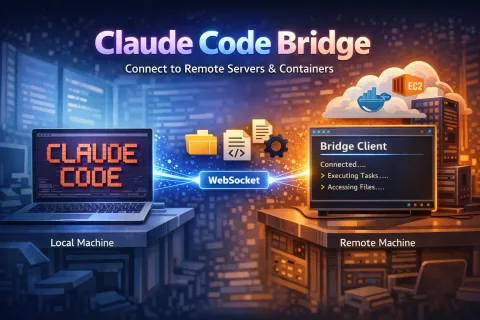
Your code lives on a remote dev server. Your database runs in Docker. Your staging environment sits in a cloud VM. Without direct access, you're stuck SSHing in manually or running separate Claude sessions on each machine.
Claude Code Bridge solves this by connecting your local Claude Code to remote environments via WebSocket. Once connected, Claude gains the ability to read, write, list, and delete files on any remote machine as if they were local.
How It Works
Bridge runs in two modes: host and client.
The host runs on your local machine alongside Claude Code. It exposes MCP tools that let Claude interact with connected remotes.
The client runs on your remote machine, container, or server. It executes file operations and sends results back to the host.
Setup
Install the package globally, add it as an MCP server, and start the host with Claude Code. On your remote machine, connect the client using your local machine's IP address.
That's it. Claude Code now has file access to the remote environment.
What Claude Can Do
Once connected, Claude gains these MCP tools:
- bridge_read_file - Read any file on the remote
- bridge_write_file - Create or modify files
- bridge_delete_file - Remove files
- bridge_list_directory - Browse directories
- bridge_status - Check connection status
You can ask Claude to edit a config file on your dev server, inspect logs in a container, or update code on a cloud VM. All without leaving your local session.
Use Cases
Remote development servers — Edit files without SSHing in
Docker containers — Modify code from outside the container
Multi-machine projects — Manage microservices across different hosts
Cloud VMs — Work on EC2 instances from your laptop
CI/CD debugging — Fix files on build servers
Client Console
The remote client shows all incoming tasks in real-time. You can watch Claude work across machines as commands flow through.
Configuration
You can create a config file at ~/.claude-bridge/config.yml for persistent settings like instance name, port, host, and task timeout.
Requirements
Node.js 20 or higher
Claude Code with MCP support
The full CLI reference, troubleshooting tips, and advanced configuration options are in the README.
Links
Simple VPS Provisioner
Here is the revised version with the correct documentation URL:
Simple VPS Provisioner
Simple VPS Provisioner is a command-line tool that turns a fresh Debian or Ubuntu VPS into a production-ready LAMP environment for Drupal or WordPress with a single command. It’s designed for clean installations and provides a consistent, automated way to deploy sites, manage domains, configure PHP versions, and handle optional SSL via Let’s Encrypt.
What It Does
The tool provides a complete stack including Nginx, PHP-FPM, MariaDB, and optional HTTPS, then configures each site with isolated PHP pools, secure credentials, and a production-grade firewall. It supports both Drupal and WordPress, multiple domains on a single server, Git-based deployments, database imports, and basic authentication to restrict access when needed. Since it is idempotent, you can safely run it multiple times to apply updates or verify the configuration.
Getting Started
To install the tool on a new VPS, run:
curl -fsSL https://raw.githubusercontent.com/willjackson/simple-vps-provisioner/main/install-from-github.sh | sudo bash
After installation, provisioning a site takes only one command. For Drupal (with HTTPS):
sudo svp setup example.com --le-email admin@example.com
or for WordPress (with HTTPS):
sudo svp setup example.com --cms wordpress --le-email admin@example.com
If you prefer to start without SSL, omit the email flag and access your site over HTTP. Once provisioning completes, your site is ready at the domain you specified.
Additional Capabilities
Simple VPS Provisioner includes commands for updating PHP versions, managing SSL certificates, deploying from Git repositories, enabling or disabling HTTP basic auth, verifying server configuration, and setting up multiple domains or environments. You can also import databases during setup or adjust settings through command-line flags, making repeatable deployments easy to script or automate.
Learn More
Full documentation, examples, and troubleshooting guides are available at https://simple-vps-provisioner.will.gg/. The source code and installation scripts can be found on GitHub at https://github.com/willjackson/simple-vps-provisioner.
Simple VPS Provisioner aims to make server setup predictable and fast, providing a straightforward way to deploy Drupal or WordPress sites without manually configuring each service.